Showing posts with label photoshop. Show all posts

March 11, 2011

Etude House (Avatar Series Commercial)

annyeonghaseyo,, tadi tgh boring2 gi belajar photoshop dkat youtube... tgok org buat avatar.. then nak buat jugak..

tgh cari2 gambar,, terjumpe gambar Park Shin Hye.. Lagipun dye tengah pegang lipstick jenama etude house.. boleh laa buat iklan terus...

 konon2nye nak buat mcm gambar yg kat bawah ni

alih2 , jadi mcm ni daaaa

edit, edit, edit & edit

-
-
-
-
-
-
-
-
-
-
-
-
-
-
-
-
-
-
-
-
-
-
-
-
-
-
-
-
-
-
-
-
-
-
-
-
-
-
-
-
-
-
-
-
-
-
-
-
-
-
-
-
-
-
-
-
-
-
-
-
-
-
-
-
-
-
-
-
-
-
-
-
-
-
-
-
-
-
-
-
-
-
-
-
-
-
-
-
-
-
-
-
-
-
-
-
-
-
-
-
-
-
-
-
-
-
-
-
-
-
-
-
-
-
-
-
-
-
-
-
-
-
-
-
-
-
-
-
-
-
-
-
-
-
-
-
-
-
-
-
-
-
-
-
-
-
-
-
-
-
-
-
-
-
-
-
-
-
-
-
-
-
-
-
-
-
-
-
-
-
-
-
-
-
-
-
-
-
-
-
-
-
-
-
-
-
-
-
-
-
-
-
-
-
-
-
-
-
-
-
-
-
-
-
-
-
-
-
-
-
-
-
-
-
-
-
-
-
-
-
-
-
-
-
-
-
-
-
-
-
-
-
-
-
-
-
-
-
-
-


nak dekat lagi?
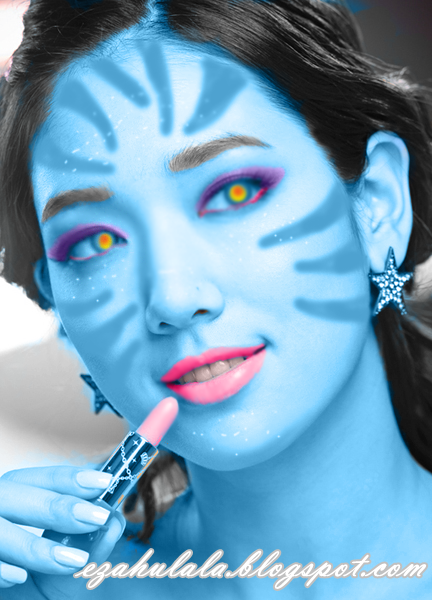
tadaaaaaaaa, model baru utk iklan Etude House.. hehehehe

ok la,, nak belah da ni, annyeong!

p/s: gamabr2 ni saje2 je buat, bukan sebab x suke artis tersebut,, disebabkan sukalah sye pilih gambar Park Shin Hye sbgai model... untuk suke2 ajeee~

February 14, 2011

Photoshop Tutorial - Tukar warna anak mata

annyeonghaseyo! how are you? fine? good. hari ni aku dapat request photoshop tutorial from hidayah ,

abaikan jawapan aku~

ok,, so here how's :

>First at all korang perlu ada Adobe Photoshop CS3, kalau takde boleh click sini
>File>Open pilih gambar yg hendak di-edit

source image: google

yg tu gambar yg aku nak edit.

ok, gambar akan jadi macam ni, bila korang tarik image tu ke phooshop
then, tekan zoom yg berada disebelah kiri image. 

ok, bila korang nak zoom tu, bukan kena klik sekali, tapi lebih kurang
macam korang nak crop gambar. 

lepas itu, tekan 'Polygonal Lasso Tool' korang kene tekan sekali then click 'Polygonal Lasso Tool'
kalau korang punye berbeza.

the best part is change your iris colour!
ok, bila korang dah select semua bola mata tu,
tekan Image>Adjustment>Hue/Saturation

then akan ade pop-up window, disitu korang boleh tukar warna anak mata korang..

so,, ini hasilnya..

before

after

so selamat mencuba! ada soalan? boleh comment dibwah :)

December 13, 2010

Wuuuhuuuuu! aku da reti...

annyeonghaseyo! selamat pagi!! wink-wink... haha,, hari ni aku banyak berlajar pasal photoshop dri abg aku,, thanks angah! muaahhhhh! hehe,, oke,, beberape tahun lepas aku pernah download photoshop sebab tgok senior2 blogger suke sgt pakai photoshop, da download2 tuu x reti gune pulak,, waktu tu aku reti gune photoscape je,, huang, huang, hunag bute IT =.=' ,, happy giler,, haha.. cube korang tgok kat 'follow me' kat sidebar tuu, gambo pocoyo tu aku yg crop, bukan buat!  *tu pon nak bangge =T_____T=*

click untuk zooooooooom.

wihiiiiiiiiiiiiiiiiiiiii,, soo pade sesiape yg nak follow aku tu perasan! jgan malu2 untuk tekan gambar pocoyo tu,, hua hua hua,, oke tu je lahhh byeeeee,

\
\
\
\
\
\
\
\
\
\
\
\
\
\
\
\
\
\
\
\
\
\
\
\
\
\
\
\
\
\
\
\
\
\
\
\
\
\
\
\
\
\
\
\
\

TU JEEE?! ALAIHAI BOSAN NYEEE T__________T